Skills
22 Claude Skills to Automate Your Customer Support
The Ootto Team · 8 min read · June 12, 2026
How to use this
1Connect Claude to Instagram
Connect Claude to your Instagram account
One click opens Claude with the connector already filled in - sign in, authorize, and it's live. No key to copy, no setup outside your browser.
https://mcp.ootto.ai/mcpConnect2Add the skills
Once Claude can reach your account, give it the methods to work with. Clone the free repository and Claude discovers the skills automatically.
git clone --depth 1 https://github.com/Ootto-AI/claude-content-skills.git && bash claude-content-skills/install.shBrowse all 30 skills on GitHubInstructions: how to connect your Instagram account to Claude
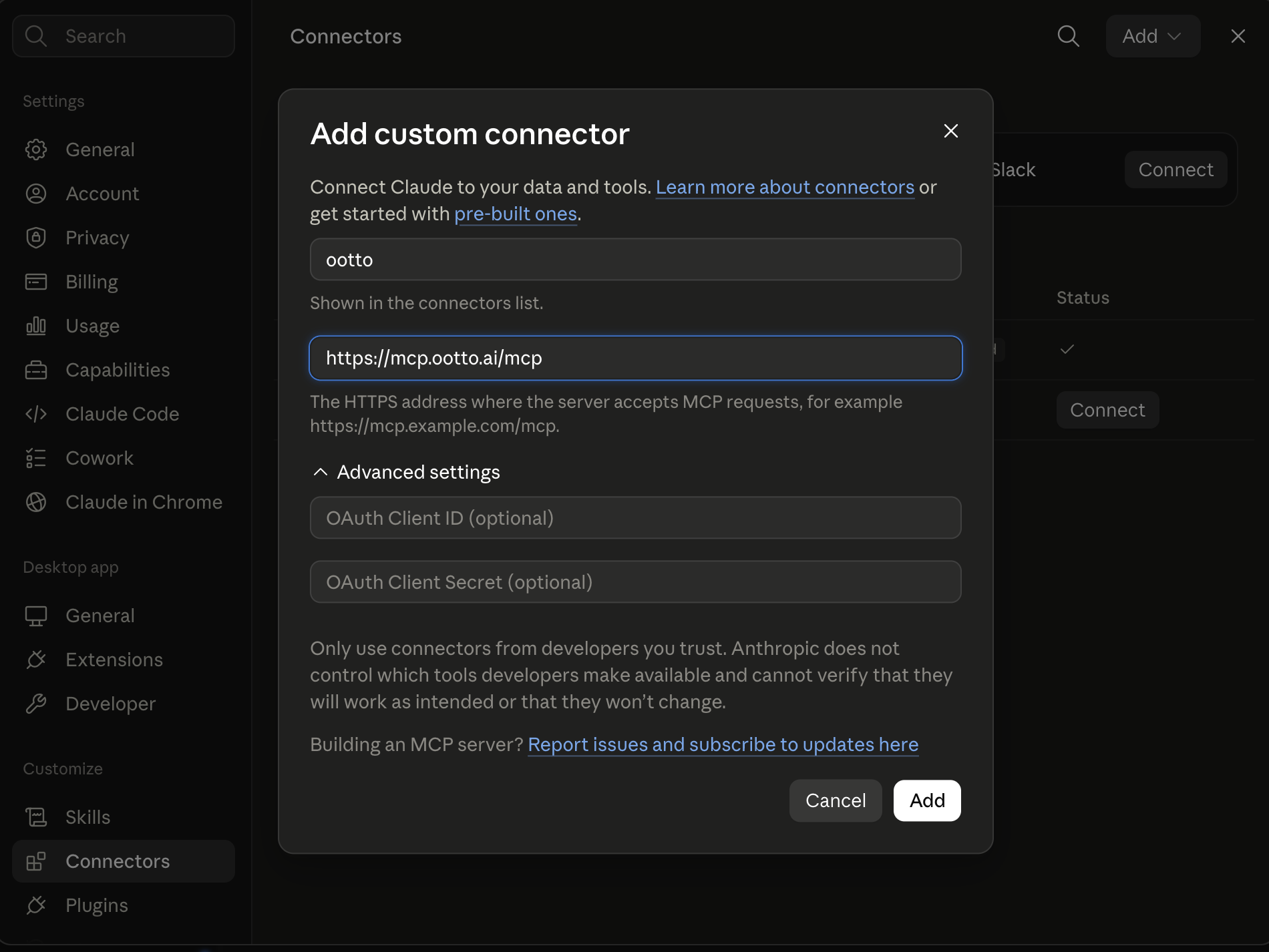
Connect above does this for you. If Claude ever opens the dialog empty, here's exactly what goes where:
Ootto
Your 24/7 Instagram Growth Operator
Skip the manual setup
- Posts finished Reels straight to your Instagram
- Real motion-graphic Reels, not slideshows
- Built around your own photos and footage
- Finds winning content opportunities in your niche
- Writes on-brand scripts and captions
- Answers every comment by your own keyword rules
- DMs qualified leads and starts the conversation
- Runs up to 50 Instagram accounts
One AI. Every Post. Every Comment. More Leads. More Sales.
Support is the work that never lands at a convenient time. A refund request at 9pm. A one-star review while you're with a client. The same "how do I reset my password" question for the fortieth time. Most of it is repetitive, some of it is high-stakes, and all of it wants a fast, on-brand reply — which means you, personally, re-reading and re-typing the same answers all week.
These 22 skills hand the repetitive parts to Claude. Each one is a structured prompt that does a single support job: draft a reply in your brand voice, triage a ticket so it lands in the right place, write the refund-and-apology email, cool down an angry customer, or respond to a Google review. You paste the message, Claude does the draft, you stay in control of what goes out.
They're markdown. Add them to Claude as a Project, or paste them as prompts.
Get all of these as files: the whole set is free on GitHub → Claude Support Skills. Install it as a Claude Code plugin, or copy any prompt below.
What these are
A skill is a reusable prompt that does one job well. Not a chatbot you train, not code you maintain — a block of text you keep handy and reuse whenever the job comes up.
"Reply drafter" replaces the ten minutes you spend making a support answer sound human and on-brand. "Ticket triager" replaces the scan-and-sort you do every morning before you can actually help anyone. "Complaint de-escalator" replaces the deep breath and the three rewrites before you respond to someone who's furious. Together they replace the slow, draining parts of support — without putting a generic bot between you and your customers.
Setup: adding skills to Claude Projects
- Open Claude (claude.ai or the desktop app) and create a Project.
- Add your support context as project knowledge — your brand voice, your refund and return policy, your top FAQs, your escalation rules.
- Paste any skill below into the chat, add your data (the customer message, the ticket, the review), and run it.
- Reuse it whenever the job comes up. The Project remembers your policies and tone so every reply sounds like you, not like a template.
Setup: connecting live data (MCP)
For skills that need live data — pulling a ticket from your help desk, an order from Stripe, a thread from Gmail — an MCP connector lets Claude read directly from your tools instead of you copying and pasting. It's optional and more technical to set up.
No MCP? Still works. Every skill below runs fine if you just paste the raw data — the email, the ticket text, a screenshot of the review, the order details.
The 6 most used
1. Reply drafter (brand voice)
Turns a customer message into a ready-to-send reply that sounds like your business.
Here's a customer message: [paste]. Draft a reply in our brand voice — warm, clear, no corporate filler. Answer the actual question, keep it under 120 words, and end with a friendly next step. Our tone: [describe or link your voice guide].
2. Ticket triager
Sorts and tags incoming tickets so the right ones get handled first.
Here are today's support messages: [paste]. For each, give me: a one-line summary, a tag (billing / bug / how-to / complaint / feature request), urgency (high / medium / low), and whether it needs me or can be handled with a standard answer.
3. FAQ answerer
Deflects the repetitive questions with an accurate answer pulled from your own docs.
A customer asked: [paste question]. Using our help docs below, write a complete, friendly answer. If the docs don't fully cover it, say what's missing instead of guessing. Docs: [paste or link].
4. Refund / apology email writer
Drafts the refund or make-it-right email so you don't have to find the words.
A customer is owed a refund: [paste situation and order details]. Write the email — apologize once and sincerely, confirm the refund amount and timing, explain briefly what happened if relevant, and don't grovel. Keep it professional and human.
5. Complaint de-escalator
Writes a calm, fair reply to an angry customer that lowers the temperature.
A customer is upset: [paste their message]. Write a response that acknowledges how they feel, takes responsibility where it's warranted, avoids being defensive, and offers a concrete next step. Don't make promises we can't keep. Keep it sincere, not scripted.
6. Review responder (Google / Yelp)
Replies to a public review in your brand voice — for the good ones and the brutal ones.
Here's a [star]-star review: [paste]. Write a public response. If positive, thank them and reference something specific. If negative, stay gracious, acknowledge the issue, and invite them to continue offline — never argue in public. Keep it short.
All 22 skills
Reply drafting & brand voice
- Reply drafter — a customer message becomes a ready-to-send reply in your voice (see above).
- Brand voice tuner — paste a stiff draft, get it rewritten to sound like your business.
- Multi-channel responder — adapt one answer for email, live chat, and SMS lengths and tone.
- Bug / issue reporter — turn a customer's confused report into a clean ticket for whoever fixes it.
Knowledge & FAQ answers
- FAQ answerer — accurate answers pulled from your own docs (see above).
- Knowledge-base article writer — turn a question you keep getting into a reusable help article.
- Onboarding helper — a step-by-step guide that walks a new customer through getting started.
Triage, routing & prioritization
- Ticket triager — summarize, tag, and rank the day's incoming messages (see above).
- Intent classifier — label what each message is really about so it routes correctly.
- Smart router — decide who or which queue a ticket belongs to, with a one-line reason.
- SLA / priority scorer — flag which open tickets are about to breach a response promise.
Complaints, refunds & de-escalation
- Complaint de-escalator — a calm, fair reply that lowers the temperature (see above).
- Refund / apology email writer — the make-it-right email, sincere and clear (see above).
- Angry-customer cooler — a holding reply that buys time without inflaming things further.
- Policy-exception checker — decide whether a request fits your policy, and draft the yes-or-no reply.
Escalation & handoff
- Escalation summarizer — compress a long, messy thread into a five-line handoff: the customer, the history, what's been tried, and the open question.
- Resolution-step writer — turn a fix you describe into clear instructions the customer can follow.
- Status-update writer — a short "here's where your issue stands" note for a ticket that's still open, so the customer isn't left wondering.
Retention & follow-up
- At-risk / churn flagger — read the tone and history and flag accounts that look ready to leave, with why.
- Post-resolution follow-up — a short "is everything working now?" note that closes the loop. Borrow the cadence from our lead follow-up skills.
- Feedback / CSAT requester — a light, well-timed ask for a rating or a quick review.
Reputation & trends
- Review responder — a public reply to a Google or Yelp review, gracious on the good ones and the brutal ones (see above). Pairs with our reporting skills for spotting what the reviews keep flagging.
Every one of these is genuinely useful on its own. The catch is the same for all 22: you still have to remember to run them, paste the data, and send the output. Fine when a tricky complaint lands — less fine for the eighty routine tickets behind it every week.
The faster path: let Ootto run them for you
The 22 skills above are free and they work. But they're still manual — a ticket lands, you open Claude, paste it, copy the draft back, send it. Multiply that across every channel, every day, and the copy-paste becomes the job.
Ootto is the done-for-you version. Connect your tools once (Gmail, Slack, WhatsApp, Stripe, HubSpot and more), Ootto learns your brand voice, your policies, and your top answers, and it runs these same support jobs automatically — triaging tickets, drafting and sending on-brand replies, handling refunds, de-escalating complaints, and responding to reviews — surfacing only the ones that genuinely need you. It gets sharper every week, because it learns from how you handle the exceptions. See the plans and pricing, or how it compares to building flows yourself in Ootto vs Zapier.
Support lives in your inbox, so it pairs naturally with automating your inbox. The skills are manual mode. Ootto is autopilot.
Route A: do it yourself
Start with the exact free skill for this outcome
MIT, no account, no email. Install first, then run the command for your account.
For a customer reply: Support Reply Drafter
git clone --depth 1 https://github.com/Ootto-AI/claude-support-skills.git && bash claude-support-skills/install.sh
Installs the free MIT Support Skills bundle into ~/.claude/skills in one shot.
/support-reply-drafter [customer message]
Drafts a reply in your brand voice that directly answers the question with one next step.
Route B: let Ootto run it
Ootto replicates this on autopilot
Open the dashboard, connect once, then let the pipeline handle research, production, and lead replies.
Open the connector dashboard
Go to /content/login, sign in, and open your Ootto content dashboard.
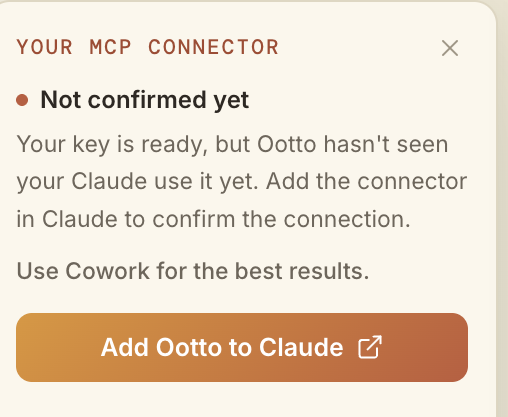
Add Ootto to Claude
Use the one-button Add flow so Ootto appears in Claude's Connectors panel.
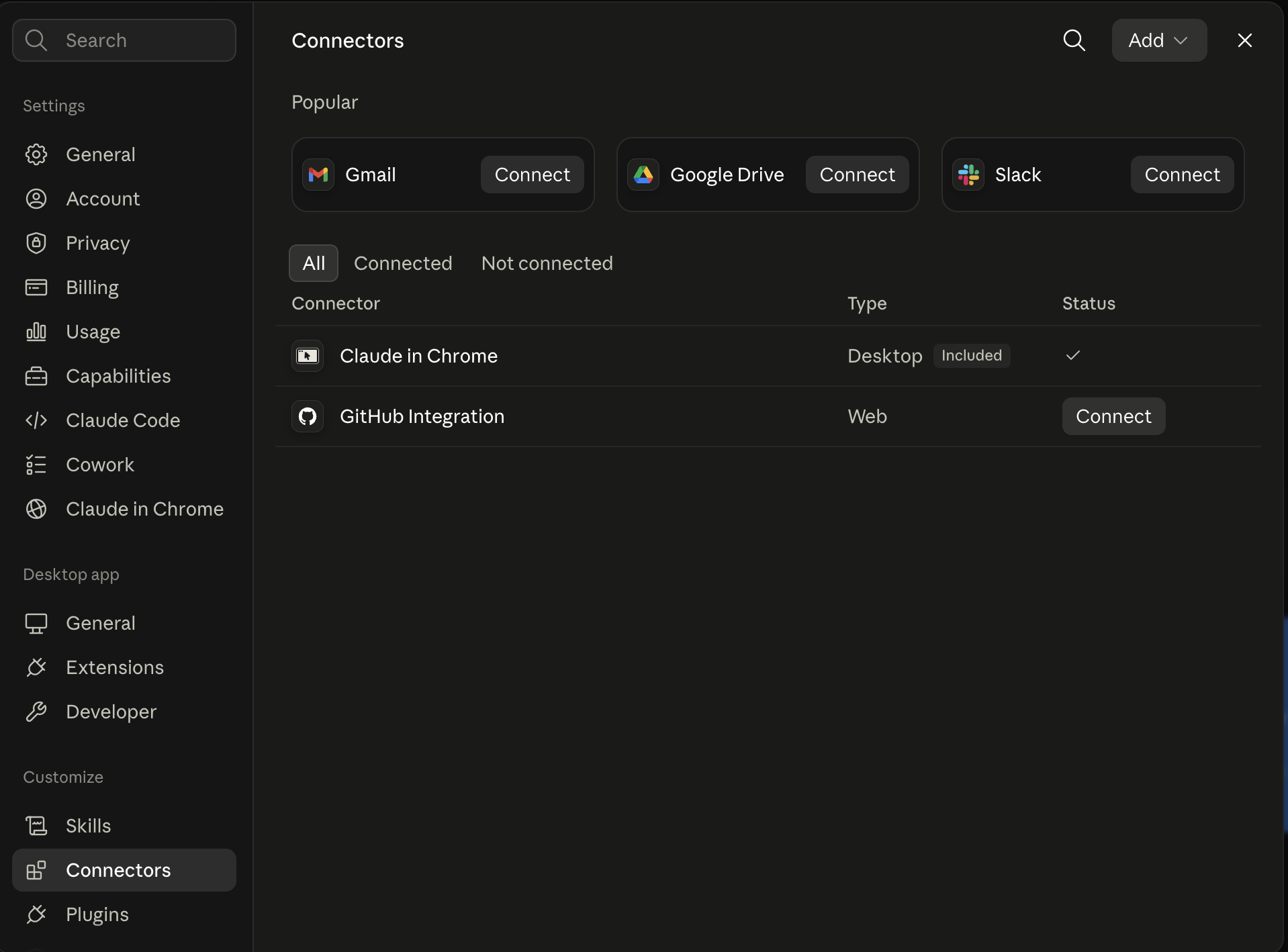
Claude shows the connector
The connector lands in Claude's Connectors settings, confirming Ootto is wired.
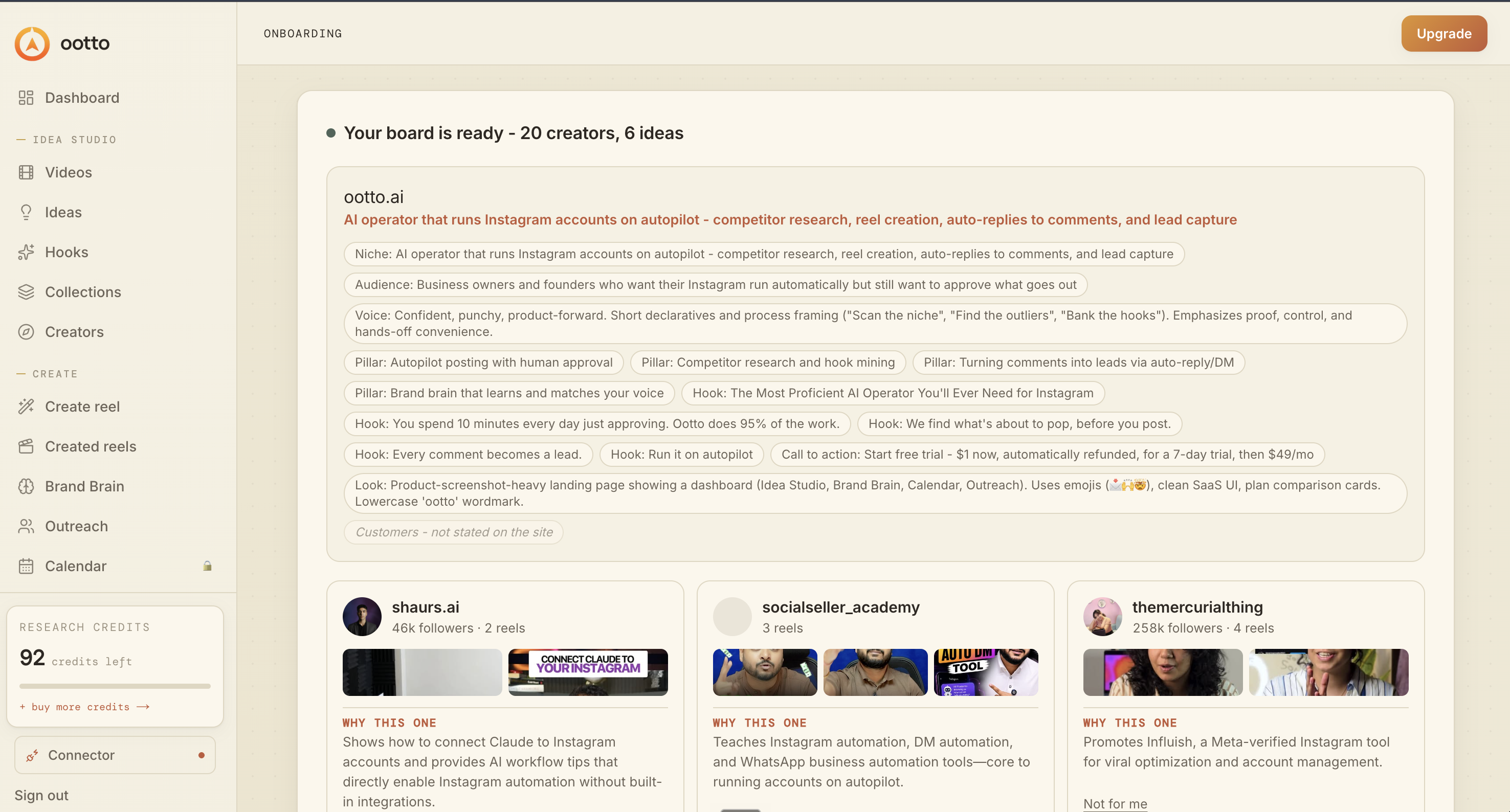
Board reads back your context
Your audience, pillars, voice, and creator signals are filled from account context.
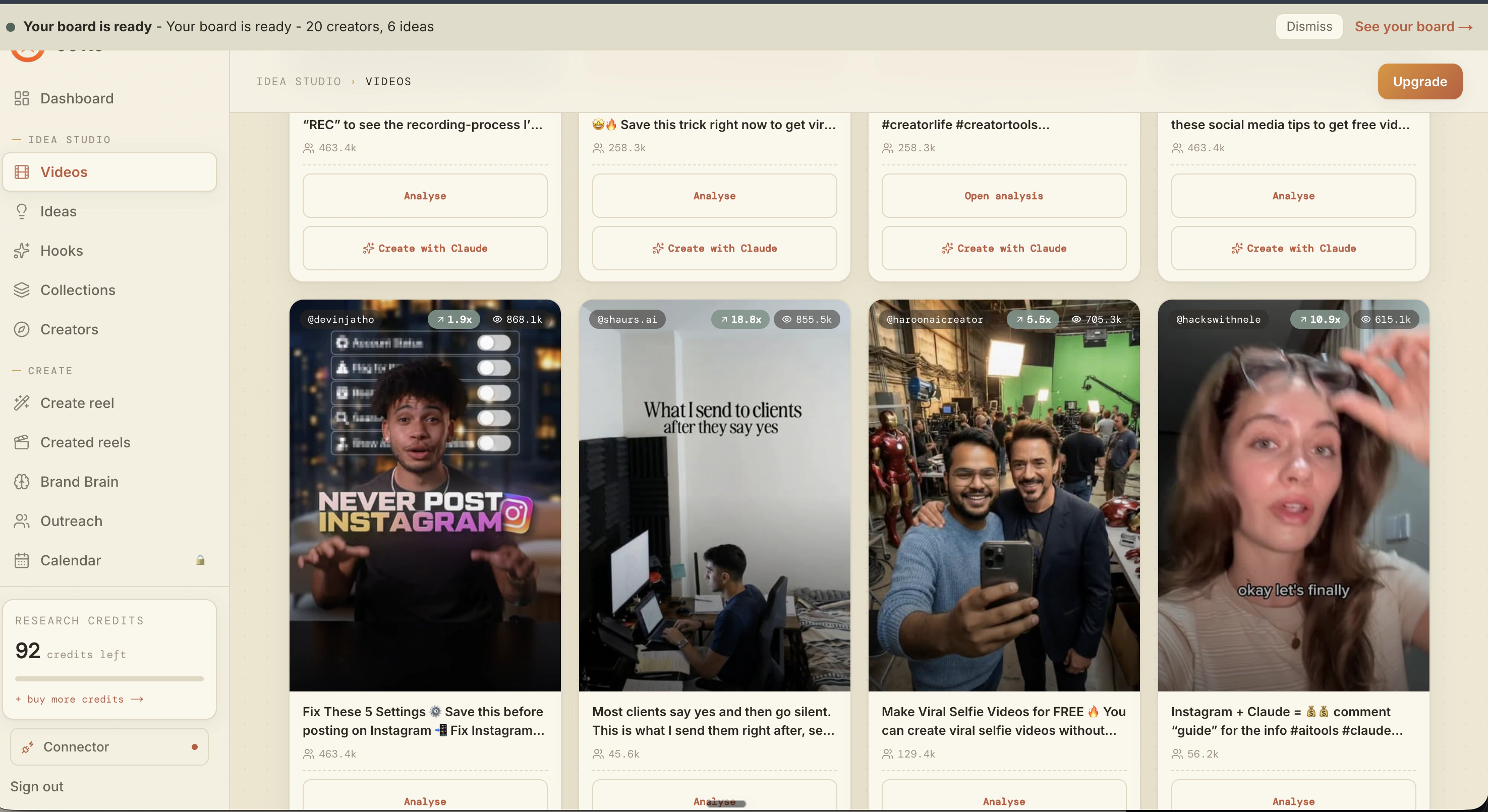
What is actually working now
Ootto pulls what is moving in your niche and loads ranked examples in board.
Reels post, comments get answered
Finished reels publish to Instagram and comments are answered with public replies plus DM follow-ups.
Ootto
Run Ootto in your Claude
Skip the manual setup
- Finds winning content opportunities
- Creates on-brand Reels and captions
- Replies to comments instantly
- Starts personalized DM conversations
- Qualifies leads automatically
- Helps book calls and drive sales
- Learns and improves with every interaction
One AI. Every Post. Every Comment. More Leads. More Sales.
Get started$1 today, non-refundable. Starts your 7-day trial, then $48/mo. Cancel anytime.
Get started