Skills
21 Claude Skills to Automate Your Lead Follow-Up
The Ootto Team · 8 min read · June 12, 2026
How to use this
1Connect Claude to Instagram
Connect Claude to your Instagram account
One click opens Claude with the connector already filled in - sign in, authorize, and it's live. No key to copy, no setup outside your browser.
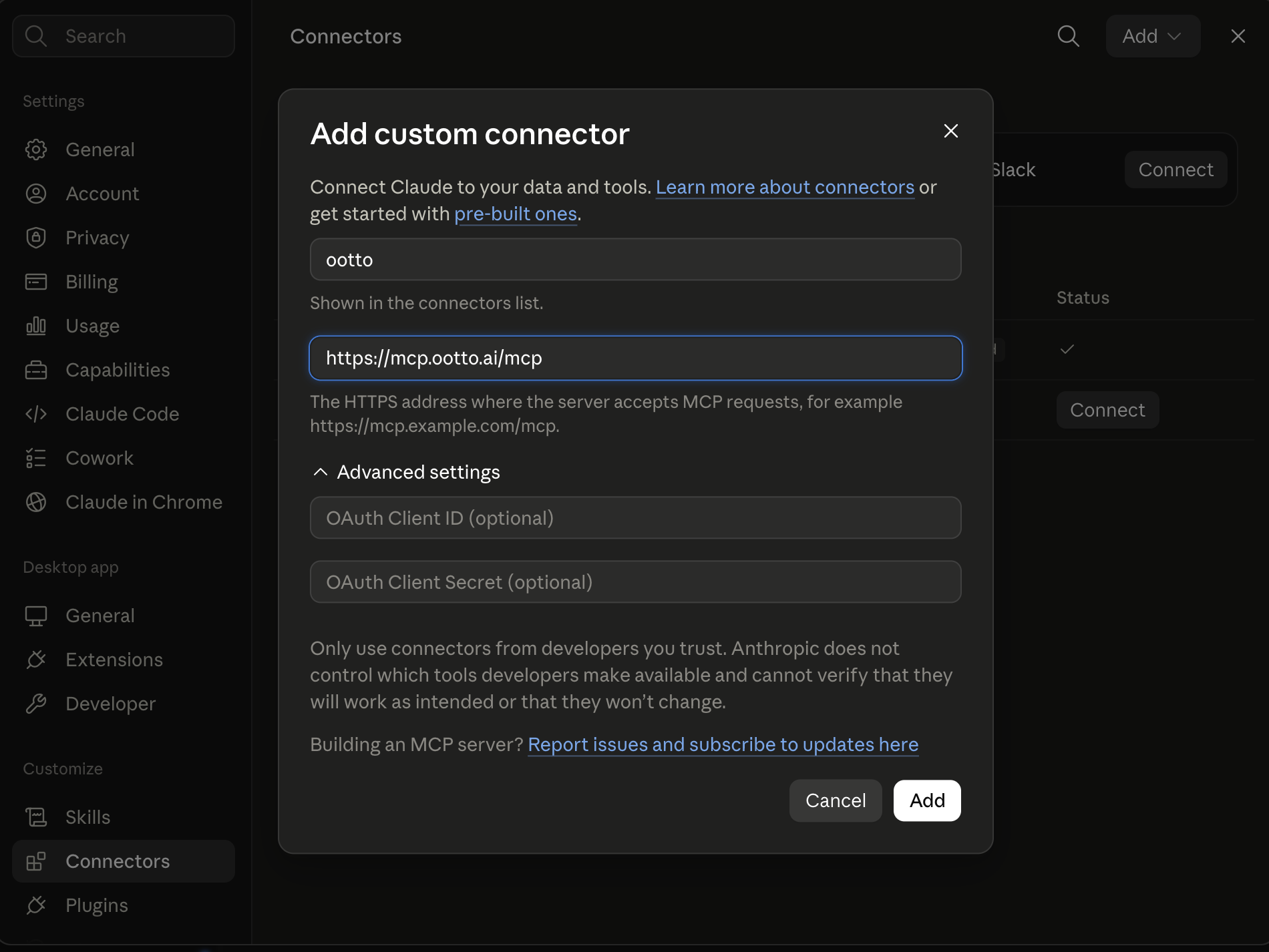
https://mcp.ootto.ai/mcpConnect2Add the skills
Once Claude can reach your account, give it the methods to work with. Clone the free repository and Claude discovers the skills automatically.
git clone --depth 1 https://github.com/Ootto-AI/claude-content-skills.git && bash claude-content-skills/install.shBrowse all 30 skills on GitHubInstructions: how to connect your Instagram account to Claude
Connect above does this for you. If Claude ever opens the dialog empty, here's exactly what goes where:
Ootto
Your 24/7 Instagram Growth Operator
Skip the manual setup
- Posts finished Reels straight to your Instagram
- Real motion-graphic Reels, not slideshows
- Built around your own photos and footage
- Finds winning content opportunities in your niche
- Writes on-brand scripts and captions
- Answers every comment by your own keyword rules
- DMs qualified leads and starts the conversation
- Runs up to 50 Instagram accounts
One AI. Every Post. Every Comment. More Leads. More Sales.
Most leads don't say no. They go quiet — and the follow-up that would have closed them never gets sent. You meant to reply to that inbound form within five minutes. You meant to nudge the quote you sent last Tuesday. You meant to circle back with the prospect who said "next quarter." But you were slammed, and the lead went cold.
These are 21 Claude skills that take the dull, repetitive parts of lead follow-up off your plate: the fast first reply, the qualifying, the multi-touch sequence, the objection reply, the dormant-lead win-back. Each one does a single job, so you can paste in a real lead and get a real, sendable result.
They're markdown. Add them to Claude as a Project, or paste them as prompts.
Get all of these as files: the whole set is free on GitHub → Claude Lead Skills. Install it as a Claude Code plugin, or copy any prompt below.
What these are
A skill is a reusable prompt that does one job well. Not "write me a follow-up email" — a specific, structured prompt that takes a lead and produces the exact next touch, scored and ready to send.
One skill replaces a recurring task you'd otherwise do by hand or forget entirely: triaging a new inbound lead, writing the third follow-up that actually adds value, drafting the objection reply, reviving a deal that stalled six weeks ago. You bring the judgment and the context; the skill does the writing.
Setup: adding skills to Claude Projects
- Open Claude (claude.ai or the desktop app) and create a Project for sales follow-up.
- Add your business context as project knowledge — what you sell, who your ideal customer is, your tone, your typical price points, and what a good-fit lead looks like.
- Paste any skill below into the chat, add your data (the form submission, the email thread, the call notes, the stalled quote), and run it.
- Reuse it whenever the job comes up. The Project remembers your context, so you swap in a new lead instead of rewriting the prompt every time.
Setup: connecting live data (MCP)
For skills that need live data — pulling a lead's full history from your CRM, or checking which deals went quiet — an MCP connector lets Claude read directly from your tools instead of you exporting and pasting. It's optional and more technical to set up.
No MCP? Still works.
Every skill below runs fine on pasted data — a form submission, an email thread, a CRM export, a screenshot of your pipeline. Paste the raw context and the skill works the same. MCP just removes the copy-paste step.
The 5 most used
1. Instant New-Lead Reply
Gets a sharp, personalized reply out the moment a lead lands — before they move on to a competitor.
A new lead just came in: [paste the form submission, email, or message]. We're [company], we help [audience] with [outcome]. My tone is [warm and direct / professional]. Write a short first-touch reply that thanks them, shows I read their specific situation, gives one genuinely useful insight, and proposes a clear next step. Under 120 words, no corporate filler, one question max, sounds like a human.
2. Follow-Up Sequence Builder
Turns a single lead into a whole multi-touch cadence where every message adds value — never just "checking in."
Lead: [name, company, what they care about, where we left off]. We sell [product] for [outcome]. Write a 5-touch follow-up sequence spread over ~14 days. Each touch must add something new — a tip, a resource, a relevant proof point, a different angle. Number them, tell me how many days to wait between each, give a subject line for each, and make touch 5 a soft breakup. Each email under 100 words, vary the openers.
3. Personalized Email Drafts
Writes the next touch in your voice, tuned to exactly where this specific deal stands.
Here's a lead and our last exchange: [paste thread]. Write the next follow-up — natural, specific to what we discussed, moves things forward without being pushy. Reference something concrete from the conversation, give one clear reason to reply now, suggest one next step. Under 90 words. Sound like me, not a template.
4. Meeting Booker
Closes the gap between "interested" and an actual slot on the calendar.
[Name] has shown interest [how], but we haven't booked time. Recent context: [paste]. My availability: [times]. Booking link: [link]. Write a brief nudge that proposes 2–3 specific time slots and includes the link, making it effortless to confirm. Under 80 words, friendly not needy, one clear call to action.
5. Dormant-Lead Re-Engager
Revives a deal that went silent with a low-pressure message that's easy to answer.
This lead went quiet [X weeks] ago after [a demo / a quote / a good call]. Here's the thread: [paste]. Write a short, low-pressure re-engagement email. Give them an easy out ("if now isn't the time, no problem — just say so and I'll stop following up"), but make it just as easy to say yes. Warm, zero guilt-trip, under 90 words, make the reply take 10 seconds.
All 21 skills
Speed-to-lead & first touch
- Instant New-Lead Reply — the fast, personalized first reply to a fresh inbound lead (see above).
- Lead Router — read a new lead and decide who should own it and why, with a one-line handoff note.
- Inbound Form Auto-Responder — a clean confirmation reply for form fills that sets expectations and a next step, including an after-hours version that holds the lead until you're back.
Qualify & score
- Lead Qualifier — score a new lead Hot / Warm / Cold against your fit criteria, with the strongest signals and biggest risks.
- Lead Scoring — rank a batch of open leads so you chase the highest-value ones first instead of newest-first.
- Enrich Lead Profile — turn a name, email, and website into a short brief: likely company size, role, and what they probably care about.
Multi-touch sequences
- Follow-Up Sequence Builder — one lead into a full value-led cadence (see above).
- Personalized Email Drafts — the next single touch, in your voice, tuned to the deal (see above).
- Cadence Reminder Nudge — given a thread and the last touch date, tell me if it's time to follow up and draft the message if so.
- Channel-Switch Follow-Up — when email isn't landing, draft the same message reframed for a quick SMS, LinkedIn note, or voicemail script.
Objections & booking
- Objection-Handler Replies — turn "too expensive / bad timing / using someone else" into an honest, non-defensive reply in two versions, gentle and direct.
- Meeting Booker — close the gap between interest and a booked slot (see above).
- No-Show Re-Booker — a light, no-guilt message that assumes good intent and offers two fresh times in one click.
- Pre-Meeting Brief — turn the lead's history into a one-page brief: who they are, their pain, likely objections, and your goal for the call.
CRM & recaps
- Auto CRM Note Logger — turn messy interaction notes into a clean, structured CRM entry with the fields you actually track.
- Call/Meeting Recap — rough call notes into a same-day recap email: what we discussed, the value they're after, and next steps with owners and dates.
- Next-Step Task Creator — read a thread and produce the concrete follow-up tasks with suggested due dates, so nothing falls through.
Re-engage & expand
- Dormant-Lead Re-Engager — revive a silent deal with a low-pressure, easy-to-answer note (see above).
- Proposal/Quote Nudge — a polite, specific nudge on a quote that's been sitting, restating the value and making it easy to say yes.
- Win-Back Lost Deal — a warm re-open for a deal marked lost months ago, leading with what may have changed since.
- Referral & Review Ask — a natural ask to a happy customer for an introduction or a review, leading with their success so it never feels like begging.
The faster path: let Ootto run them for you
The 21 skills above are free, and they work. Used consistently, they put you ahead of most competitors — because most competitors give up after the first follow-up.
But "used consistently" is the catch. The skills solve the writing. They don't solve the remembering — noticing a lead went quiet, finding the right thread, triggering the right prompt, sending it, setting a reminder to follow up again in three days, and logging it to your CRM. That manual loop is where follow-up actually breaks down, and it's the reason we wrote a deeper piece on how to automate lead follow-up with AI.
Ootto is the done-for-you version. Connect your tools once — Gmail, Slack, HubSpot and the rest — and Ootto learns how your business follows up, then runs these same jobs automatically: replying to new leads fast, qualifying them, sending the right touch at the right time, spacing the cadence sensibly, re-engaging dormant deals, and logging everything back to your CRM, without you triggering anything. It gets sharper every week.
The skills are manual mode. Ootto is autopilot.
Route A: do it yourself
Start with the exact free skill for this outcome
MIT, no account, no email. Install first, then run the command for your account.
For the first reply to a lead: First-Touch Follow-Up
git clone --depth 1 https://github.com/Ootto-AI/claude-lead-skills.git && bash claude-lead-skills/install.sh
Installs the free MIT Lead Skills bundle into ~/.claude/skills in one shot.
/first-touch-follow-up [the lead's message + what you offer]
Writes the opening reply to a brand-new lead in a warm, human tone.
Route B: let Ootto run it
Ootto replicates this on autopilot
Open the dashboard, connect once, then let the pipeline handle research, production, and lead replies.
Open the connector dashboard
Go to /content/login, sign in, and open your Ootto content dashboard.
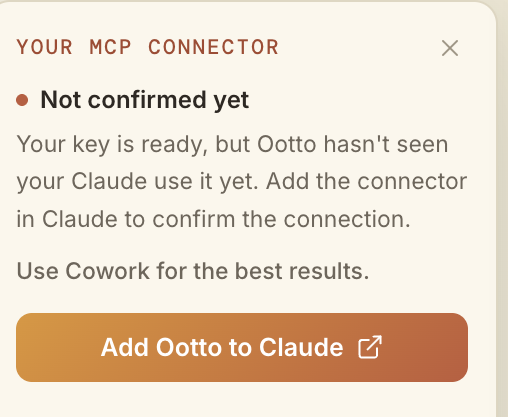
Add Ootto to Claude
Use the one-button Add flow so Ootto appears in Claude's Connectors panel.
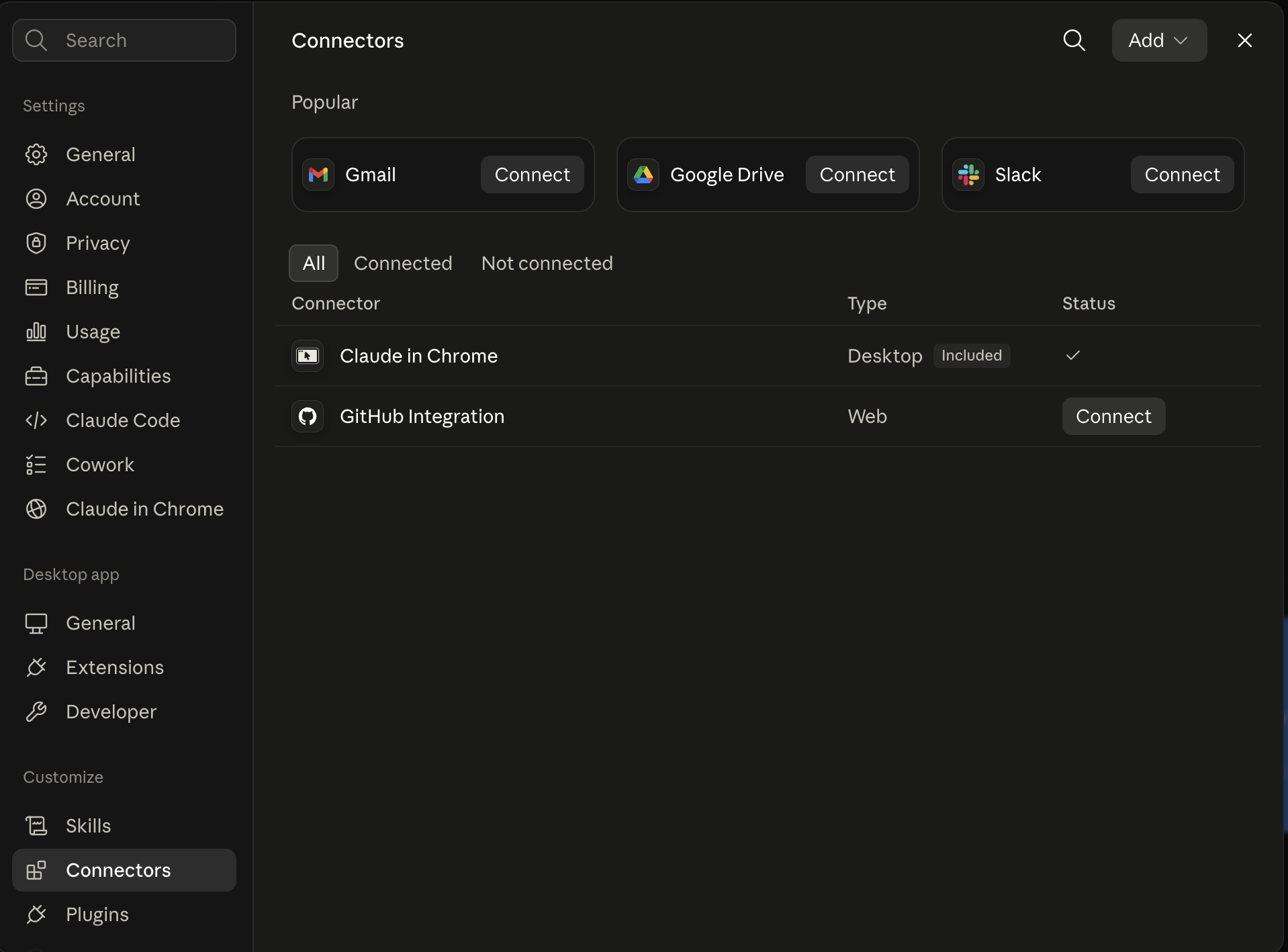
Claude shows the connector
The connector lands in Claude's Connectors settings, confirming Ootto is wired.
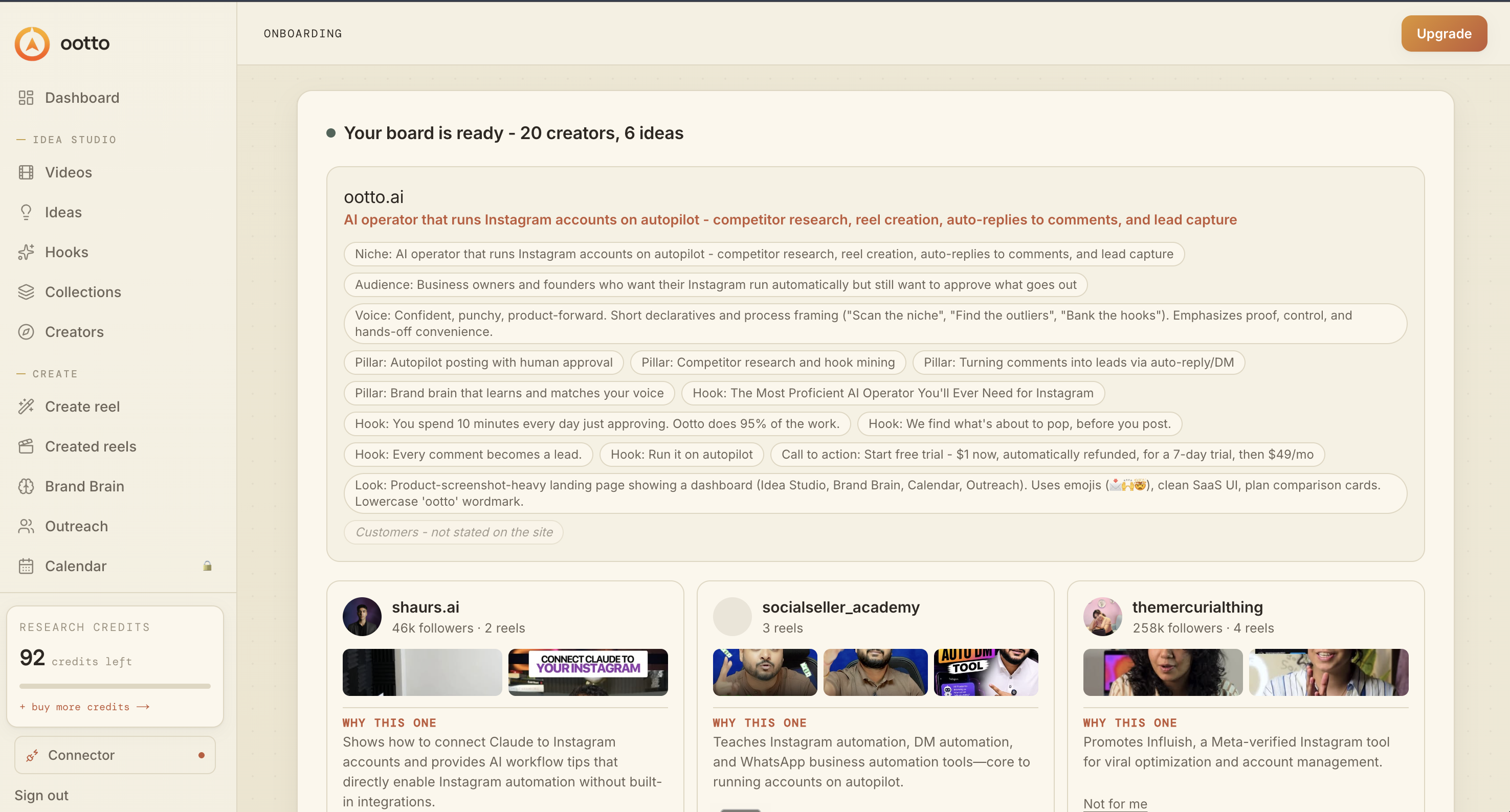
Board reads back your context
Your audience, pillars, voice, and creator signals are filled from account context.
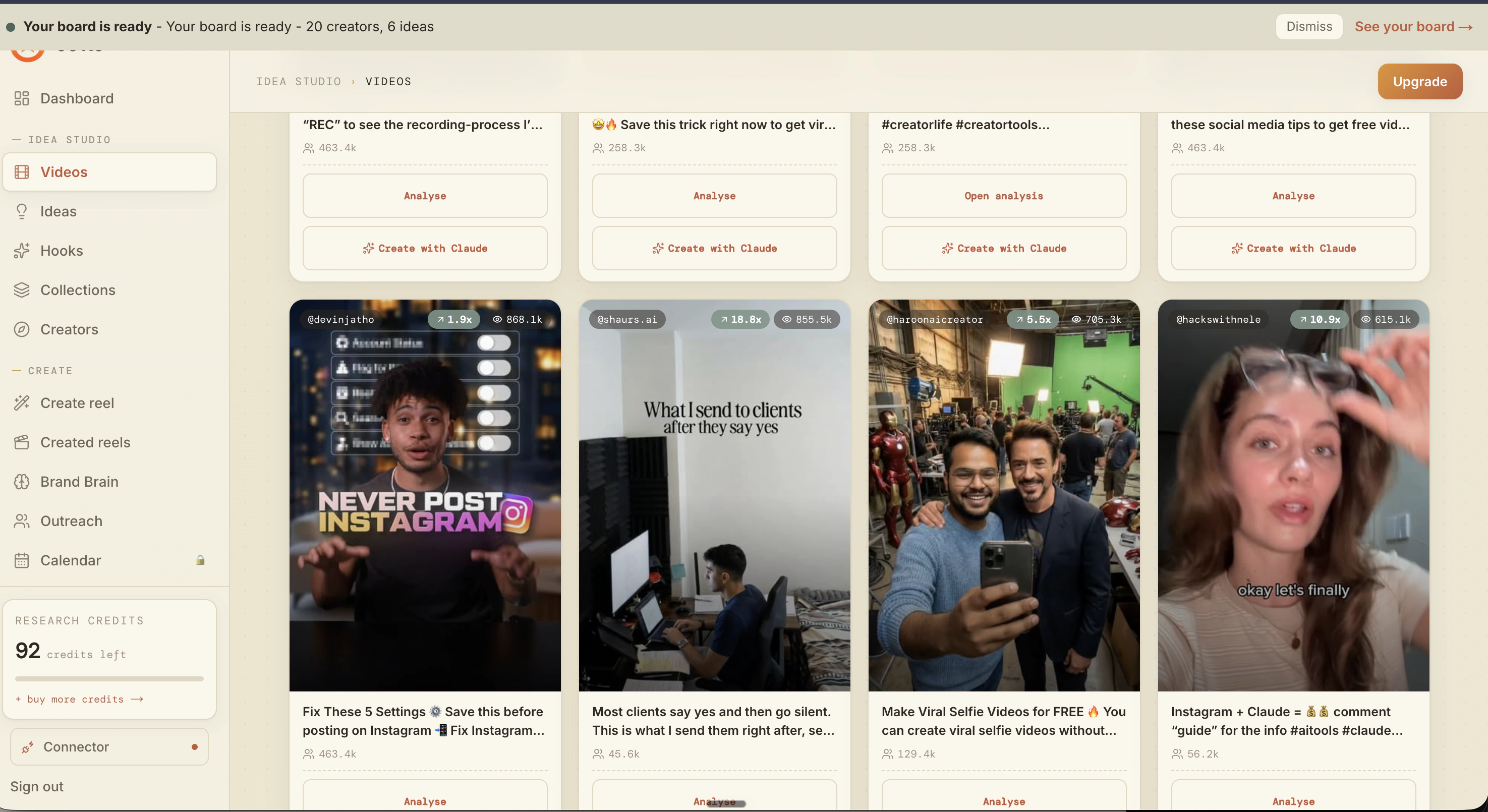
What is actually working now
Ootto pulls what is moving in your niche and loads ranked examples in board.
Reels post, comments get answered
Finished reels publish to Instagram and comments are answered with public replies plus DM follow-ups.
Ootto
Run Ootto in your Claude
Skip the manual setup
- Finds winning content opportunities
- Creates on-brand Reels and captions
- Replies to comments instantly
- Starts personalized DM conversations
- Qualifies leads automatically
- Helps book calls and drive sales
- Learns and improves with every interaction
One AI. Every Post. Every Comment. More Leads. More Sales.
Get started$1 today, non-refundable. Starts your 7-day trial, then $48/mo. Cancel anytime.
Get started