
Comparisons
Cancel a ManyChat trial before the first charge
The Ootto Team · 1 min read · August 19, 2026
How to use this
1Connect Claude to Instagram
Connect Claude to your Instagram account
One click opens Claude with the connector already filled in - sign in, authorize, and it's live. No key to copy, no setup outside your browser.
2Add the skills
Once Claude can reach your account, give it the methods to work with. Clone the free repository and Claude discovers the skills automatically.
git clone --depth 1 https://github.com/Ootto-AI/claude-content-skills.git && bash claude-content-skills/install.shBrowse all 30 skills on GitHubInstructions: how to connect your Instagram account to Claude
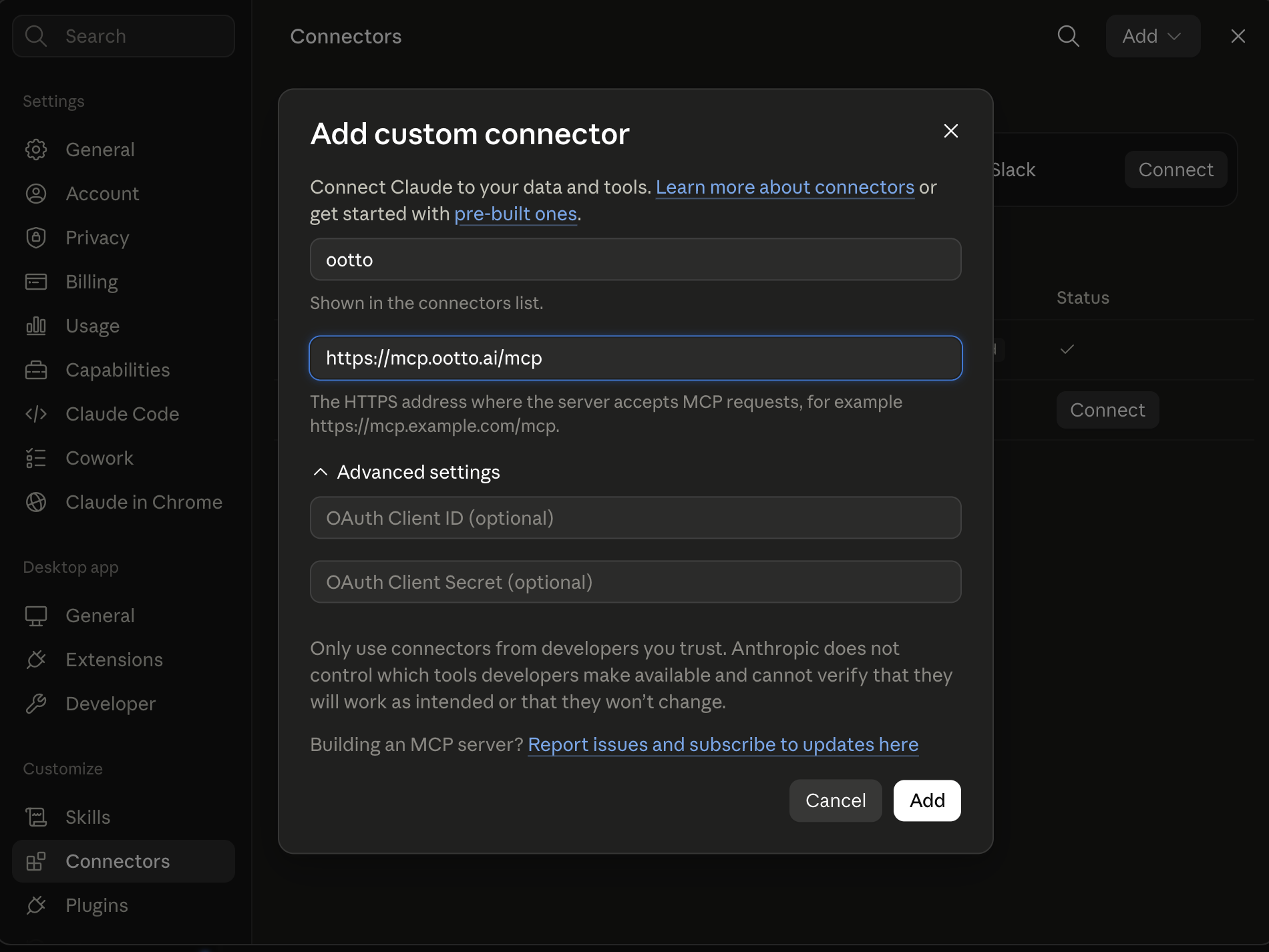
Connect above does this for you. If Claude ever opens the dialog empty, here's exactly what goes where:
Ootto
Your 24/7 Instagram Growth Operator
Skip the manual setup
- Posts finished Reels straight to your Instagram
- Real motion-graphic Reels, not slideshows
- Built around your own photos and footage
- Finds winning content opportunities in your niche
- Writes on-brand scripts and captions
- Answers every comment by your own keyword rules
- DMs qualified leads and starts the conversation
- Runs up to 50 Instagram accounts
One AI. Every Post. Every Comment. More Leads. More Sales.
As of 2026-08-19, the first charge usually occurs after the trial ends unless auto-renew controls are disabled.
Trial cancellation sequence
- Confirm whether the trial is web-billing or mobile-billing.
- Cancel in the correct Billing control.
- Verify your next billing date and invoice queue.
- Keep one tested automation export before any account changes.
Where to click
- Web trial: Settings → Billing → Cancel Subscription.
- Mobile trial: App Store or Google Play flow.
Migration note
Pause new flow changes until cancellation state is confirmed. Then migrate one tested workflow first.
Verified source and date
- ManyChat Help Center - “How to start or renew your subscription” (Updated Nov 27, 2025): https://help.manychat.com/hc/en-us/articles/14281375479324-How-to-start-or-renew-your-subscription
- ManyChat Help Center - “How to cancel your ManyChat subscription” (Updated Dec 03, 2025): https://help.manychat.com/hc/en-us/articles/14281418466972-How-to-cancel-your-Manychat-subscription
- ManyChat Help Center - “Mobile Subscriptions” (Updated Jun 01, 2026): https://help.manychat.com/hc/en-us/articles/26788419978780-Mobile-Subscriptions
Continue
Ootto
Run Ootto in your Claude
Skip the manual setup
- Finds winning content opportunities
- Creates on-brand Reels and captions
- Replies to comments instantly
- Starts personalized DM conversations
- Qualifies leads automatically
- Helps book calls and drive sales
- Learns and improves with every interaction
One AI. Every Post. Every Comment. More Leads. More Sales.
Get started$48/month, charged today. Cancel any time.