
Comparisons
Cancel a ManyChat subscription from an iPhone the reliable way
The Ootto Team · 1 min read · August 19, 2026
How to use this
1Connect Claude to Instagram
Connect Claude to your Instagram account
One click opens Claude with the connector already filled in - sign in, authorize, and it's live. No key to copy, no setup outside your browser.
https://mcp.ootto.ai/mcpConnect2Add the skills
Once Claude can reach your account, give it the methods to work with. Clone the free repository and Claude discovers the skills automatically.
git clone --depth 1 https://github.com/Ootto-AI/claude-content-skills.git && bash claude-content-skills/install.shBrowse all 30 skills on GitHubInstructions: how to connect your Instagram account to Claude
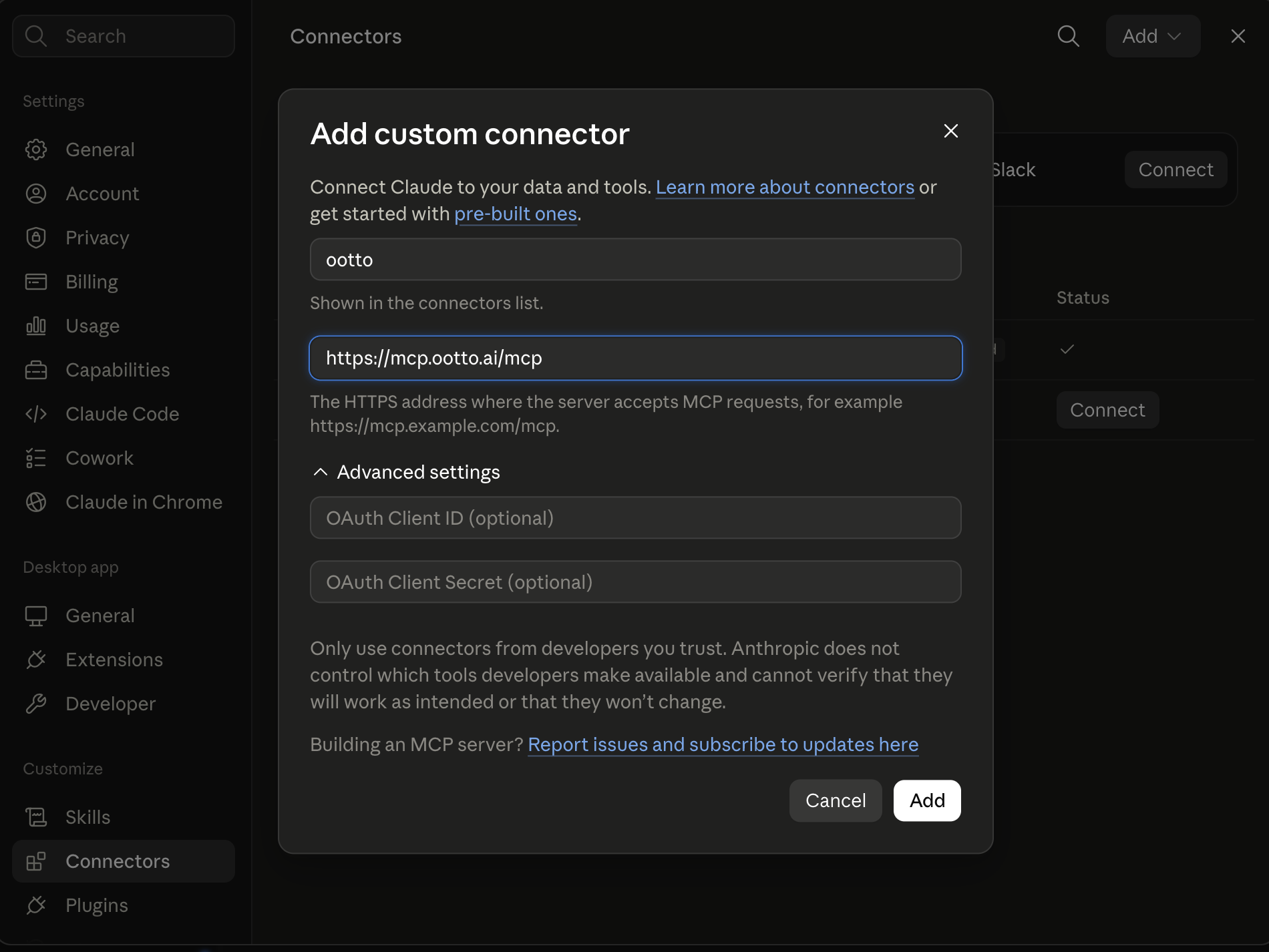
Connect above does this for you. If Claude ever opens the dialog empty, here's exactly what goes where:
Ootto
Your 24/7 Instagram Growth Operator
Skip the manual setup
- Posts finished Reels straight to your Instagram
- Real motion-graphic Reels, not slideshows
- Built around your own photos and footage
- Finds winning content opportunities in your niche
- Writes on-brand scripts and captions
- Answers every comment by your own keyword rules
- DMs qualified leads and starts the conversation
- Runs up to 50 Instagram accounts
One AI. Every Post. Every Comment. More Leads. More Sales.
As of 2026-08-19, iPhone and Android cancellations must be done in the platform store when the subscription was bought there. If you cancel in ManyChat web only, you may only change web-only access state.
Apple path (iOS)
- Open Settings.
- Tap your profile name, then Subscriptions.
- Choose ManyChat.
- Tap Cancel Subscription and confirm.
Android path (Google Play)
- Open Google Play.
- Open Payments & subscriptions.
- Select Subscriptions.
- Choose ManyChat and tap Cancel subscription.
Why this split matters
ManyChat says iOS and Android bills are handled outside ManyChat. So cancel in the store first, then confirm whether the next billing date changed.
After cancellation
- Access usually remains until the current billing period ends.
- If renewal had already been queued for the next cycle, you may still see one final processing event.
- Pause campaign edits until both store and ManyChat states are confirmed.
Verified source and date
- ManyChat Help Center - "Mobile Subscriptions" (Updated Jun 01, 2026): https://help.manychat.com/hc/en-us/articles/26788419978780-Mobile-Subscriptions
- ManyChat Help Center - "How to cancel your ManyChat subscription" (Updated Dec 03, 2025): https://help.manychat.com/hc/en-us/articles/14281418466972-How-to-cancel-your-Manychat-subscription
Continue
Ootto
Run Ootto in your Claude
Skip the manual setup
- Finds winning content opportunities
- Creates on-brand Reels and captions
- Replies to comments instantly
- Starts personalized DM conversations
- Qualifies leads automatically
- Helps book calls and drive sales
- Learns and improves with every interaction
One AI. Every Post. Every Comment. More Leads. More Sales.
Get started$1 today, non-refundable. Starts your 7-day trial, then $48/mo. Cancel anytime.
Get started